
For call center headset procurement, connection type is one of the key factors that affects deployment, maintenance, and long-term cost.
USB and QD (Quick Disconnect) headsets are both widely used in business communication environments, but they are designed for different applications.
USB headsets are mainly used with computers and UC platforms, while QD headsets are commonly used in professional contact centers that require flexible connections and easier maintenance.
Before choosing a headset, companies should first consider the communication system, number of users, and future maintenance requirements.
For a basic understanding of office and call center headset differences, please refer to:
[Office Headset vs Call Center Headset: What’s the Difference? How Should Businesses Choose?]
What Is a USB Call Center Headset?
A USB call center headset connects directly to a computer through a USB interface.
The headset usually integrates the audio processing module inside the USB cable, allowing direct communication with PC-based calling software.
Connection structure:
Headset
|
USB Cable
|
Computer / Softphone
USB headsets are commonly used in call centers based on softphone systems, Microsoft Teams, Zoom, and other UC platforms.
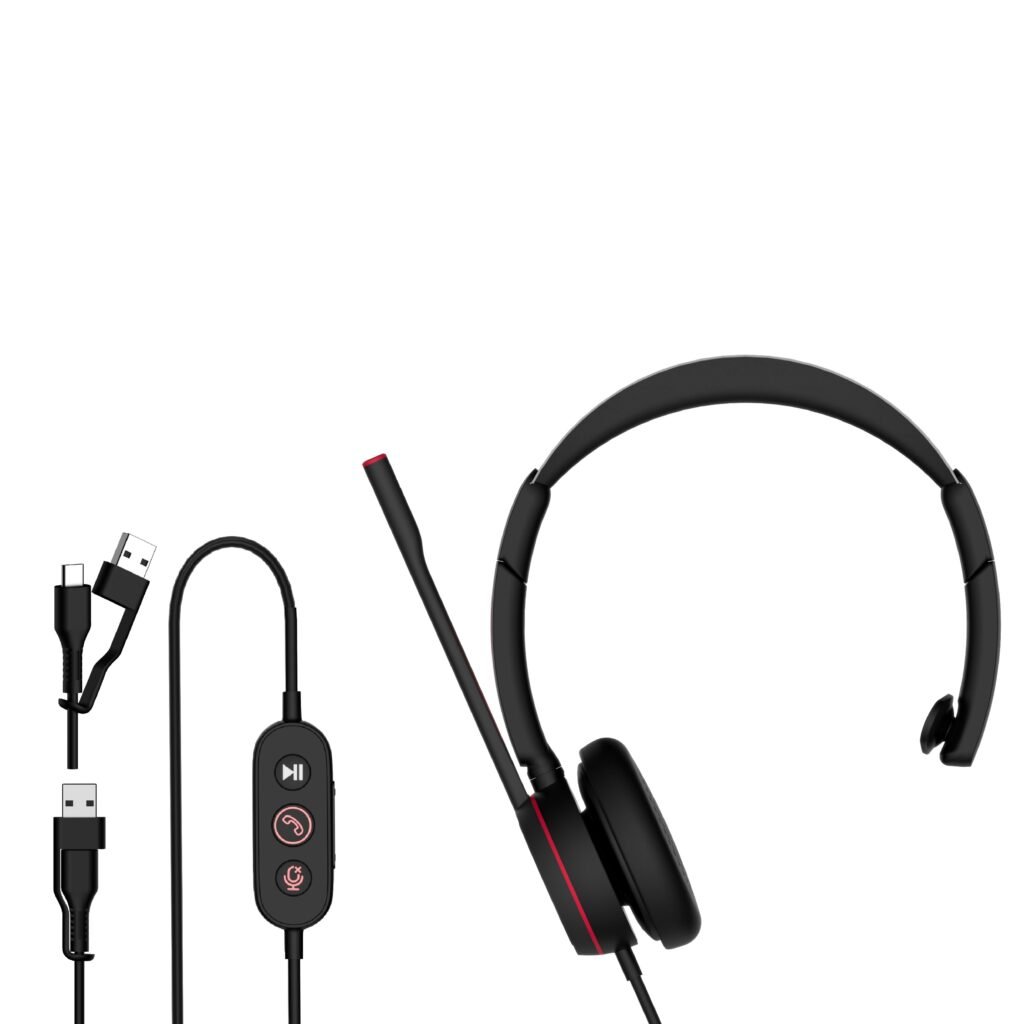
Advantages of USB Call Center Headsets
Simple Installation
USB headsets are easy to deploy because they use a direct connection.
Users only need to connect the headset to a computer, and the system can normally recognize the device automatically.
This reduces installation steps for companies deploying a large number of workstations.
Suitable for PC-Based Communication
Most modern customer service systems are built around computers instead of traditional desk phones.
USB headsets are suitable for:
Softphone systems
Microsoft Teams
Zoom
Google Meet
CRM calling platforms
For more information about USB headset selection, please read:[USB Headset Buying Guide for Enterprise Procurement]
Lower Initial Cost
Compared with modular QD systems, USB headsets have a simpler structure.
Advantages include:
Lower purchasing cost
Easier inventory management
Faster deployment
For small and medium-sized teams, USB headsets are usually a practical choice.
What Is a QD Call Center Headset?
QD stands for Quick Disconnect.
A QD headset separates the headset unit and connection cable through a detachable connector.
Structure:
Headset
|
QD Connector
|
Bottom Cable
|
Device
The same headset can work with different devices by replacing the bottom cable.
Common cable options include:
| Cable Type | Application |
| USB QD Cable | Computer / Softphone |
| RJ9 QD Cable | Desk Phone |
| USB-C QD Cable | New Devices |
| 3.5mm QD Cable | Audio Equipment |
More details: [QD Headset Explained for Call Center Buyers]

Advantages of QD Call Center Headsets
Replaceable Cable Design
The main difference between USB and QD headsets is the cable structure.
With a fixed USB headset:
Cable damaged
↓
Replace the headset
With a QD headset:
Cable damaged
↓
Replace the cable
In call centers, cables are frequently exposed to bending, plugging, and unplugging.
A replaceable cable design reduces replacement work and simplifies spare parts management.
Flexible Connection Options
Different departments may use different communication systems.
A QD headset allows companies to keep the same headset model while changing only the connection cable.
For example:
Desk phone users → RJ9 cable
PC users → USB cable
New devices → USB-C cable
This is useful for companies with mixed communication environments.
Suitable for Large Contact Centers
QD headsets are commonly used in:
BPO centers
Customer service departments
Sales teams
Enterprise support centers
For large deployments, maintenance efficiency is often more important than the initial product price.
USB vs QD Call Center Headset: Key Differences
| Feature | USB Call Center Headset | QD Call Center Headset |
| Connection | Fixed USB cable | Detachable cable |
| Main Application | PC communication | Contact center systems |
| Installation | Plug and play | Requires cable selection |
| Cable Replacement | Replace headset | Replace cable |
| Flexibility | Medium | High |
| Initial Cost | Lower | Higher |
| Large Deployment | Suitable | More suitable |
USB and QD are designed for different working environments.
The correct choice depends on the communication system and maintenance requirements.
Which One Should You Choose?
Choose USB Call Center Headsets When:
USB headsets are suitable for companies where:
Agents mainly use computers
Typical applications:
Online customer service
Softphone calling
Remote support teams
The company uses UC platforms
Examples:
Microsoft Teams
Zoom
Google Meet
USB connection provides a simple deployment process without additional cables.
Fast installation is required
For new teams or temporary projects, USB headsets can be installed quickly with minimal configuration.
Choose QD Call Center Headsets When:
QD headsets are more suitable when:
Desk phones are still widely used
Traditional contact centers often use IP phones or desk phones that require QD cables.
Large-scale maintenance is required
For hundreds or thousands of users, cable replacement becomes a regular maintenance task.
QD design allows companies to replace damaged cables without replacing complete headsets.
Communication systems may change
If users switch between desk phones and computers, QD headsets provide more flexibility.
Factors to Consider Before Bulk Purchasing
1. Confirm Your Communication Platform
Before ordering, identify the devices used by employees.
| Communication System | Recommended Connection |
| PC Softphone | USB |
| Microsoft Teams | USB |
| Zoom | USB |
| Desk Phone | QD / RJ9 |
| Mixed System | QD with different cables |
Selecting the correct interface can avoid compatibility issues during deployment.
2. Consider Total Ownership Cost
The purchase price is only one part of the cost.
Companies should also consider:
Cable replacement
Spare parts
Product lifespan
Maintenance workload
For large call centers, a modular design may reduce long-term operating costs.
3. Check Product Durability
Call center headsets are used intensively every day.
Important reliability tests include:
Headband strength test
Cable bending test
Plug/unplug test
Microphone boom rotation test
Button life test
A stable mechanical structure helps reduce replacement frequency.
Boxin Call Center Headset Solutions
Boxin Electronics provides USB and QD headset solutions for business communication applications.
Solutions include:
USB call center headsets
QD call center headsets
Noise cancelling headsets
Products can be customized according to:
Connector type
Cable design
Microphone performance
Acoustic requirements
Packaging requirements
Learn more:[Call Center Headset Solution]
FAQ
Q1.Are USB headsets better than QD headsets?
Not always.USB headsets are suitable for PC-based communication, while QD headsets are more suitable for professional call centers requiring flexible connections.
Q2.Can QD headsets connect to computers?
Yes.A QD headset can connect to computers by using a USB QD cable.
Q3.Which headset is suitable for Microsoft Teams call centers?
USB headsets are usually easier to deploy for Teams-based environments because they connect directly to computers.
Q4.Why do many call centers still use QD headsets?
Because QD headsets allow cable replacement and provide flexible connection options for different communication systems.
Conclusion
USB and QD call center headsets are designed for different applications.
USB headsets are suitable for PC-based communication where simple deployment is required.
QD headsets are suitable for professional contact centers where flexibility and maintenance efficiency are important.
Before bulk purchasing, companies should evaluate their communication platform, deployment scale, and long-term maintenance requirements.
Choosing the right connection design can reduce unnecessary replacement costs and improve daily operation stability.